Vietne neatbalsta jūsu pārlūkprogrammu. Lūdzu, atjauniniet pārlūkprogrammu vai lejupielādējiet citu
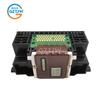
Print Head QY6-0080 For iP4850 MG5250 MX892 iX6550 MG5320 MG5350 iX6500 QY6-0080
Pašreizējā cena
Cena 43,58 €Ielāde...
Ielāde...
Ielāde...
Ielāde...
Ielāde...
Ielāde...
Ielāde...
Ielāde...
Ielāde...
Ielāde...
Ielāde...
Ielāde...
Ielāde...
Ielāde...
Ielāde...
- The Dinosaur Not Mom Black Vintage Washed Tee Pure Cotton T-Shirt
- Memorable Christmas Keepsakes Ornaments Clear Faceted Crystal Snowflake Pendant Annual Edition for Tree Decoration Women Earring Jewelry High-Quality
- 1Pc Vintage Metal Purse Bag Frame Kiss Clasp Lock With Bamboo Handle Jewelry Clasps Sewing Fasteners Purse Making Supplies
- Chrome Diopside Gemstone Handmade Statement Proposal Ring, 925 Sterling Silver RR-10-1
- Durvju pakaramais apavu organizators - Izturīgs Oksfordas audums, 6-35 kabatas, Lielas ietilpības apavu plaukts, Vietu taupošs skapja uzglabāšanas risinājums, Acs aizmugure, Dāvanas ideja
- Linen Blend Solid Color Grommet Curtains - Double Panel for Bedroom and Living Room
- Pre-owned adidas originals HANDBALL SPEZIAL JP8726-P26103661094011
- Paranoia PERFECT BLUE Classic Unisex T-Shirt
- Fashion Clogs Platform For Eva Women Thick Bottom Wedges Heels Garden Sandals Woman Summer Comfort Non Slip Beach Slippers
- 3D ABS Glossy Black Turbo 4MATIC Car Fender Badge AMG Emblem A45 Logo Sticker for Mercedes Benz a 45 AMG W176 W177 Rear Trunk TYD2

Bezmaksas piegāde uz ASV
8. novembrim

Tavas maksājumi un privātums ir droši


Garantijas un atmaksas


Nedēļot atgriešanu
Droša loģistika
Kvalitātes garantija
Privātuma aizsardzība
Apraksts
Specifications:
Condition: Refurbishment
Product Name:Print Head QY6-0080
Print Color: Only Black
Compatible Model: for: IP4820;MX892;MG5320;IX6510;6560;MX882;886 iP4850 MG5250 MX892 iX6550 MG5320 mg5350 ix6500
Installation Steps:
1.Make sure the power is on.
2.Lift the scan assembly until it locks in place (1). The print head bracket moves to the middle.
3.Open the output tray (2).
4.Open the inner cover. Caution: A. do not attempt to move or block the print head bracket manually. b. Do not touch any
metal parts. c. Do not touch transparencies (a), film connector (b), ink collector (sponge part) (c) or any metal parts.
5.Lift the fixing rod and take out the print head. The print head can be removed with the ink cartridge.
6.Then put the print head back in place and press down the fixing rod.
7.Close the inner cover. Caution: press the middle of the inner cover until it locks into place.
8.Return the scan assembly to its original position. The LCD displays a message asking if the ink cartridge has been replaced.
9.Press the [right arrow] and select [no] to exit.
10.Put letter or A4 size plain paper in the automatic paper feeder.
11.Press [copy] or [Photo].
12.Press [menu] repeatedly until [user data] appears.
13.Select [maintenance] using [left arrow] or [right arrow].
14.Press .
15.Use [left arrow] or [right arrow] to select [align head].
16.Press . This machine prints the print head position pattern.
17.Starting from column a of the printout, mark the tick mark in the pattern closest to the image. (A) Column a (b): poor
example (least compact box) (c): good example (most compact box)
18.Use [left arrow] or [right arrow] to select the number of the pattern in column a of the printout in step 17.
(A) : column: select the number of the pattern closest to the image.
19.Press .
20.Repeat steps 18 and 19 for columns B through K.
Package Included:
1pc x Print Head
Notes:
Other accessories demo in the picture is not included.
Due to the light and screen setting difference, the item's color may be slightly different.
Precautions for use:
1. Before installing the print head of the printer, make sure that the printer can be used normally and the main board is in normal contact.
2. Clean the ink cartridges of the printer before installation. If you install printhead when it is not clean, it is easy to burn.
3. Wipe the chip print head (copper sheet position) with chip protection liquid, and then install the print head repeatedly.


Līdzīgas preces



Bieži uzdotie jautājumi
- Kādi maksājumu veidi ir pieejami Joom?Joom atbalsta plašu vietējo un starptautisko maksājumu veidu klāstu Eiropas pircējiem, tostarp debetkartes un kredītkartes (Visa, Mastercard, Maestro), PayPal, Apple Pay un Google Pay, kā arī valsts specifiskas iespējas, piemēram, Klarna, BLIK, Multibanco, MB WAY, SEPA un Giropay. Pieejamās iespējas tiek rādītas norēķinu brīdī un atšķiras atkarībā no valsts.
- Vai es varu maksāt par dārgu pirkumu pa daļām vai vēlāk?Jā, pakalpojumi, kas ļauj pirkt tagad, maksāt vēlāk, piemēram, Klarna un Scalapay ir pieejami dažiem lielāku pirkumu gadījumiem, atkarībā no jūsu valsts, pasūtījuma summas un pakalpojumu sniedzēja noteikumiem.
- Vai es varu sekot pasūtījumam?Jā. Jūs varat sekot piegādes statusam Joom lietotnē vai mājaslapā, kā pakete tiek pārvietota.
- Kas notiek, ja mans pasūtījums nenonāk?Katrs pasūtījums ir segts ar Joom piegādes garantiju. Ja jūsu pasūtījums nav ieradies līdz garantētajam datumam, kas norādīts jūsu pasūtījuma detaļās, sazinieties ar Joom atbalstu, un mēs izsniegsim pilnu atmaksu.
- Vai ir droši maksāt Joom?Jā. Joom izmanto drošu maksājumu sistēmu, un pārdevējs netiek apmaksāts, līdz jūs esat saņēmis savu pasūtījumu, kas pievieno papildu aizsardzības slāni pirkumam.
- Kas notiek, ja mans pasūtījums nenonāk pie manis vai produkts nav tāds, kā gaidīts?Ja jūsu pasūtījums netika piegādāts, ieradās bojāts vai neatbilst aprakstam, sazinieties ar Joom atbalstu — šādos gadījumos var tikt izsniegta pilna naudas atgriešana.
- Kā es varu pieprasīt naudas atgriešanu?Atveriet atbilstošo pasūtījuma lapu un sazinieties ar Atbalsta tērzētavu, kas ir pieejama mājaslapā un Joom lietotnē. Aprakstiet problēmu un sekojiet atbalsta norādījumiem.
Print Head QY6-0080 For iP4850 MG5250 MX892 iX6550 MG5320 MG5350 iX6500 QY6-0080 — pirkt lēti interneta veikalā Joom
Pieejamas krāsas:
Kvalitatīvi materiāli:
Liela izmēru amplitūda:
Atlaides līdz 70%!
Piegāde visā Eiropā, NVS, Izraēlā un Austrālijā
Starptautisks preču klāsts
Naudas atmaksa par prasībām atbilstošiem pasūtījumiem un klientu atbalsts visu diennakti
Atlaide jauno klientu pirmajam pirkumam